
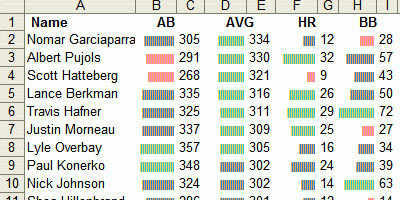
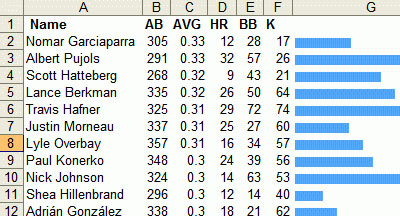
an extremely simple technique for adding simple bar charts or sparkline-like diagrams within the cells of an Excel spreadsheet. the already built-in Excel REPT function repeats any text entry a certain number of times. for instance, REPT(”X”,10) results in “XXXXXXXXXX”. so the trick is to repeat specific characters, such as a single bar “|” to create data bars.
see also a similar implementation in the upcoming Excel 12 & an artistic take as Excel drawings.
[ & ]
 information aesthetics.Where form follows data.
MORE
 Published with
  Content protected by
  Designed and Maintained by
  Time and Date follows Time Zone (Brussels)
Wow thats cool.
If you rotate the text direction, you should be able to to vertical bar charts as well. Neat trick.
I think this simple command has a lot of utility in GIS applications: you get a quick infographic within its spatial context. I've referenced your post as well as JA's in my last blog.
Cheers
This is super cool trick. I can't wait to check it out.
I see the new Excel in Windows Vista is going to be able to do this automatically.
I did this in MS Access 2.0 forms to nice effect back in '97. Different fonts have different widths for the | character, with some mods you can make almost solid bars.
Really neat trick. Try using "g" as the character and Webdings as the font. You get completely solid bars.